


Unlock Exclusive Video and Hook Strategies
Upgrade to the Fast Track Plan and receive done-for-you weekly plans to stay consistent, save time, and market smarter.

.svg)
Social Shareables

As you know, we’re always testing. One of the big zen learnings we’ve had recently was using multiple stories to drive up conversion. In fact a recent story I posted got 6x more engagement when I used the poll at the END, not the beginning of the story.

Sometimes the best way to start a conversation is to ask a question.
This Instagram Story series is designed to engage Silver Tsunami sellers by inviting them into the process—not pushing them through it. By framing it as a simple market survey, you create a safe, judgment-free space for them to reflect on what’s driving their decisions and what’s holding them back.
It builds trust, surfaces valuable insights, and opens the door to future conversations.Pro-Tip: Follow up with everyone who responds to your IG Poll.

For many Silver Tsunami sellers, it’s not about square footage—it’s about lifestyle, cost of living, and day-to-day freedom.
This carousel gives you a visual, data-backed way to highlight neighborhoods where that next chapter could actually cost less. You’re not just sharing listings—you’re showing smarter options. With property taxes, utility costs, and price points side-by-side, it’s easy for longtime homeowners to imagine what a more affordable future could look like.
Use this to educate, inspire, and start real conversations.

Side-by-side market comparisons are one of the easiest ways to create high-impact video content—and most agents overlook them.
This script isn’t just about [City 1] vs. [City 2]. It’s about helping your audience think like a buyer or seller in 2025.
When you contrast two markets:
– You simplify complex data
– You position yourself as the local expert
– You give buyers and sellers a decision-making framework
Even better? You don’t have to claim one market is “better.” You just have to show them how to choose based on their goals.
Use this script to lead with insight, build trust, and stay top of mind—because clarity is the new clickbait.

Sometimes the simplest polls spark the best convos.
We saw a version of this in a supplement ad—quick, scroll-stopping, and surprisingly effective. So we adapted it for real estate.
It’s a low-friction way to nudge your audience into thinking about their home’s value without asking for anything upfront. Just curiosity, reflection, and a little reminder that you're the go-to when they're ready to dig deeper.

Yes, your followers could look this up on Zillow. But they won’t—and they don’t want to.
That’s what makes this Instagram poll (inspired by Pip Haxby-Thompson) so effective. It’s simple: show one home that just sold for under [$] in a popular neighborhood, then ask, “Wanna see the other two?” with two easy responses:
→ Obviously
→ Yes please!
It’s low-effort for them, high-leverage for you. You create curiosity. They raise their hand. And just like that, you have a reason to DM, share a link, and start a real conversation.
Pro tip: Set up a landing page with a zoomed-in map showing the properties. It makes the whole thing feel exclusive—and positions you as the local expert who knows what’s selling, where, and for how much.

This simple Story question—used by Bill Olson to spark hundreds of replies—is a smart way to create two-way connection. It’s not just engagement for the sake of it. It’s data, dialogue, and content fuel all in one. Use it to:
• Surface what people actually care about in your area
• Kick off conversations that don’t feel salesy
• Crowdsource ideas for carousels, captions, or videos
Pro tip: Save the best answers and turn them into a shareable follow-up post like this one that garnered 452 comments (and counting).

This script was inspired by Olga Moreno’s “8 HUGE Changes Coming to Las Vegas in 2025!!” video—which pulled in over 18,000 views. Not because she went viral. But because she nailed what so many agents miss: people want the big picture.
This isn’t a market update. It’s a narrative.
It gives context to all the local change your audience is seeing—but not fully understanding. It answers the question behind the question: What’s happening in this city, and what does it mean for me?
Here’s how to make it work:
- Start strong—mention the city, the year, and why this matters now.
Use stats or headlines sparingly—this is about momentum, not overload. - Think like a tour guide. You’re not just selling homes—you’re showing them what’s coming.
And remember: people don’t just want listings. They want to follow someone who’s plugged in, paying attention, and thinking ahead. This video positions you as exactly that.
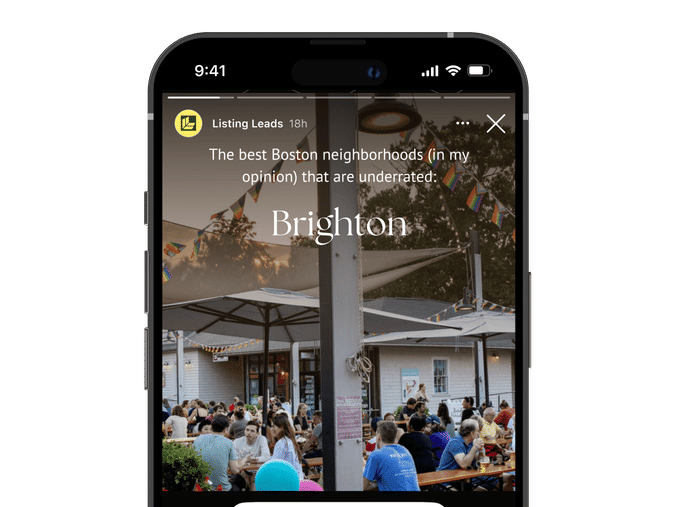
Not every post needs to be a pitch. In fact, some of the most powerful content doesn’t sell—it connects.
This Story is about starting light, local conversations that build trust over time. You’re not pushing a property. You’re inviting people into your perspective—sharing the neighborhoods you love, and asking them to weigh in.
Here’s why it works:
- It feels casual, not calculated.
- It taps into local pride and curiosity.
- It gives followers an easy reason to reply—without feeling like they’re walking into a sales convo.
Think of this as your “talk of the town” moment. Personal, relatable, and perfectly positioned to keep you top of mind.

Most agents wait until someone says, “I’m ready to move” before they start the conversation.
But the truth? Serious sellers show up months earlier—with questions, hesitations, and quiet curiosity.
That’s where this poll comes in.
It’s not just engagement—it’s early detection.
- You’ll surface potential movers before they hit the market.
- You’ll position yourself as the go-to guide, not the last-minute call.
- And you’ll gather real-time feedback from your actual audience—not a generic market report.
Use it to spark low-pressure conversations—then follow up with a simple DM to open the door.

This YouTube script was inspired by a recent video from Ken Pozek that racked up 20,000+ views—proof that “10 Things to Know” content still hits when done right. But the real magic? It’s not just about views. It’s about trust.
When someone’s thinking about relocating, they don’t want a sales pitch—they want perspective.
This script gives them exactly that:
- Personal storytelling that builds connection
- Local insights that position you as the expert
- And a clear call to action that invites the right people to reach out
Use this to build authority, grow your channel, and turn curiosity into clients.

Marketing an Open House isn’t just about posting a flyer and hoping people show up. It’s about creating a moment—something people feel like they need to be part of. And social media is where that moment starts.
Use the Canva template below as a starting point for marketing your Open House on your Instagram Stories.
Pro-Tip: After you share the template that includes the Open House information, take a couple behind-the-scenes shots of the home or neighborhood to post on your Instagram Stories in addition to the template.

Rising costs, job loss, unexpected financial struggles—homeowners are feeling the pressure. When mortgage payments start slipping, panic sets in. But here’s the truth: foreclosure isn’t inevitable. There are options, and as a real estate professional, your role isn’t just about transactions—it’s about helping people navigate tough situations.
This script is designed to do exactly that. It delivers real, actionable guidance for homeowners who may be facing pre-foreclosure or Power of Sale—before it’s too late. By sharing this message, you position yourself as a trusted resource, not just another agent chasing a deal.

Foreclosures are rising—here’s a video script to help you guide your clients.
The latest data from ATTOM reveals a 5% increase in foreclosure filings from the previous month, with 32,383 U.S. properties affected in February 2025. This uptick signals a shift in the market, and as a real estate professional, it's crucial to stay ahead.
Many homeowners don’t realize they have options before foreclosure happens. That’s where you come in. By recording and sharing this video, you can proactively educate your audience, position yourself as a trusted resource, and provide real solutions when they need them most.
This script is designed for you to easily record and post. It walks homeowners through:
✔ Loan modification – Adjusting mortgage terms to make payments more manageable.
✔ Forbearance – Temporarily pausing payments to regain financial stability.
✔ Selling before foreclosure – Preserving equity and avoiding the foreclosure process.
✔ Short sale – Selling the property for less than owed, with lender approval.
🎥 How to use this: Simply record yourself reading the script, personalize it with your insights, and upload it to your social platforms. To make it even easier, use the Canva template below as your video thumbnail to grab attention.
By sharing this message, you’re not just staying visible—you’re providing real value. And in a shifting market, that’s what sets top agents apart. Here’s the script to get started.

Most buyers have no idea what it actually takes to afford a home. They scroll listings, see the price, and assume it’s out of reach—without ever running the numbers.
That’s why this post works. It doesn’t just show a home—it makes the math real. It answers the #1 question buyers have: Can I afford this?
Inspired by Selene Hanna’s viral Instagram Reel, we’ve turned her script into a high-performing carousel. The best part? You can use it to market your own listings—or someone else’s (with permission, of course).
Ready to start conversations with serious buyers? Let’s dive in.

Most “Just Sold” posts focus on the numbers—sale price, days on market, multiple offers. But this? This is about the moment a seller realizes their home is officially sold. The relief. The excitement. The deep breath after weeks (or months) of waiting.
Inspired by Bridgette Harrington’s viral reel, this isn’t about data—it’s about the human side of real estate. The emotions, the milestones, the stories that make this job so rewarding.
This reel captures that moment. And trust me, it’s the kind of content people feel—which is exactly why it resonates.
How to Customize Your Instagram Reel Using Our Canva Template
We’ve created a plug-and-play Canva template to help you easily produce a professional Instagram Reel.
Option 1: Use the Canva Template with Stock Photos or Videos
🔹 Step 1: Open the Canva template link provided. This will open the design in your Canva account. (If you don’t have an account, sign up for free at www.canva.com.)
🔹 Step 2: Click “Use Template” to create your own editable copy.
🔹 Step 3: Customize the text:
- Double-click any text box to edit.
- Adjust fonts and colors to match your branding (optional).
🔹 Step 4: Add your logo (optional):
- Upload your logo via “Uploads” and drag it onto the template.
🔹 Step 5: Download your video:
- Click “Share” in the top right corner.
- Select “Download” > Choose MP4 format > Click Download.
🔹 Step 6: Post to Instagram Reels:
- Open Instagram and tap the + button, then select Reel.
- Upload your customized video.
- Add trending audio (optional), a compelling caption, and relevant hashtags.
- Tap “Share” — and you’re done!
Option 2: Use Your Own Videos as the Background
Want to make your reel even more personal? Use photos or videos of your client's property as the background while keeping the text animations and design from our template.
🔹 Step 1: Record or select a vertical video.
🔹 Step 2: Open the Canva template link and click “Use Template” to create your editable copy.
🔹 Step 3: Replace the background videos:
- Click on the existing video in the template.
- Choose “Delete” or “Replace background.”
- Upload your video via “Uploads” and drag it into the background frame.
🔹 Step 4: Adjust the text & design:
- Ensure your text is still readable over your custom video.
- Move or resize elements if needed.
🔹 Step 5: Download your video:
- Click “Share” in the top right corner.
- Select “Download” > Choose MP4 format > Click Download.
🔹 Step 6: Post to Instagram Reels:
- Open Instagram and tap the + button, then select Reel.
- Upload your video.
- Add trending audio (optional), a caption (which is included below), and relevant hashtags.
- Tap “Share” — and you’re done!